

Subcribe to our RSS feeds Join Us on Facebook Follow us on Twitter Add to Circles
Showing posts with label Other. Show all posts

Sunday, 10 August 2014

Easily Make Money Online for Free


What is AdFly ?

AdFly is an advertising website that enables you to shrink long Website Addresses or URLs , into short URLs, and share with friends or to your website.


When someone clicks on this links , the website shows them an Advertisement for 5 seconds and then finally directs them to the intended destination of the URLs. 
The web addresses or URls can be anything , from links to popular music songs, popular websites, popular pictures etc.

Getting Started With AdFly...

Earning Money online using Adfly is really Easy , all you need to do is to register and account, find links to popular content and share links to Facebook, twitter, google plus etc. 
The procedure is outlined below. 

1. Register for an Account with Adfly – Click Here 
2. Verify your Email Address and Log in to the Website. 
3. Find Links to popular content such as trending news, trending photos etc, Shorten the links using adfly.


4. Finally copy the links and share them with Friends on social networks.


Easy Ways and Tricks to Earn more with AdFly

Earning money with Adfly is incredibly easy , and while there exists different methods people can use, the following are the guaranteed methods to help you easily earn money online using Adfly 

  • Start a Free Blog Using Blogger : Here you can start a free blog with blogger, e.g a movies site, music site, pictures site etc and then Placing your links on the Blog . Afterwards you can share your blog, and the more people view and click on the Links, the more you earn. 

  • Upload YouTube Videos : This is the most easy to use method with guaranteed traffic. Simply download and re upload trending you tube videos, and in the Description, place your Adfly link with some text e.g “download this song by clicking..” . Soon you will get lots of Traffic. 

  • Social Networks : Share your links on Facebook pages, twitter and google plus . When people click , you earn money. 

  • Photo Sharing Sites : Share your links to photo sharing sites e.g Pinterest, Imgur and even instagram . If your photos are cool , guess what ? people will click on your links and you will Earn money.

How Much Can one Earn Using Adfly ?

While rates differ depending on countries, Adfly does pay you $1 per 1000 clicks to your links . so if you get 10,000 clicks, that is around $10 for free. 

While 10,000 clicks may seem more ? do not let it discourage you , if you successfully implement the above tips and tricks of getting more clicks with Adfly, you can easily attain more than 10,000 clicks.

Adfly Payment Methods

Currently, Adfly supports both paypal and Payoneer for payments and you can get daily payments provided you achieve a minimum $5 amount in earnings.

Register for Adfly and Start Earning Money Online

With that said , it is time to make money online. Get started by clicking on the Link below to get started using AdFly or simply Click here.

Click to join AdFly to easily earn money online.

Monday, 24 February 2014

Auslogics Disk Defrag Pro v4.2.2.0

Auslogics Disk Defrag Pro v4.2.2.0 is very capable defraggler with a clean interface and multiple defragging options. It offers better performance, more customization, and better statistics than most defragmenting software.


Auslogics Disk Defrag Pro's Features:

Smart Defrag Algorithms
  • Boot-time Defrag
  • Algorithm for SSD Drives
  • Disk Cleanup & Checkup
  • Defragmentation Wizard
  • Advanced Scheduling Options
  • Single File or Folder Defragmentation
  • List of Fragmented Files
  • Fragmentation Prevention
  • Free Space Consolidation
  • Resource Management
  • Performance Charts
  • VSS-Compatible Algorithm

Download Auslogics Disk Defrag Pro v4.2.2.0 by clicking the "Download" button below. ( please wait 5 seconds and press skip ad ) [ 5.04 Mb ]


Installation Procedure:
  1. Unrar the folder
  2. Install the file in setup folder
  3. Copy all the contents from "RiF" folder
  4. Paste them in the installation directory which is normally C: drive.
  5. Run the application
  6. Enjoy the full version :)


Advanced System Care Ultimate 7.0.1.589

Advanced System Care Ultimate 7 is based on number 1 ranked Bit Defender antivirus technology and IObit anti-malware engine. It provides protection against all kinds of security threats, system slowdown, freeze and crash without slowing down your system. It is compatible with other security software and includes all features of Advanced System Care PRO.


Advanced System Care Ultimate 7 Front page

Advanced System Care Ultimate 7 Tuneup scan page


Advanced System Care Ultimate 7 detailed options

OS : Windows XP, Vista, Windows 7, Windows 8, Windows 8.1 (32-bit & 64-bit)

Advanced System Care Ultimate 7.0.1.589 Features:

Protection
  • Basic Protection from Security Threats
  • Enhanced Malware Protection
  • Keep Your System Free From Viruses, Trojans and Worms
  • Proactively Block Threats When Downloading and Sharing
  • Surf and Search the Web Safely
  • Enjoy Confident Security without System Slowdown


Performance
  • Basic System Optimization
  • Ultimate System Tuneup for Top Performance
  • 300% Internet Speedup with Internet Booster
  • Real-time Optimization with Active Optimize
  • Deep Windows Registry Clean
  • Maximum Hard Drive Performance
  • Over 20 Smart Tools for Daily PC Maintenance


Privacy
  • Auto Clean for Privacy Security Whenever You Log on
  • Block Malicious Attempts to Access Your Personal Data


Download Advanced System Care Ultimate 7.0.1.589 from the download link below ( please wait 5 seconds and press skip ad ) [ 56.39 Mb ]


Installation Procedure:
  1. Unrar the downloaded file
  2. Disconnect your internet
  3. Follow the instructions from the readme file
  4. Enjoy !!

Tuesday, 18 February 2014

Adobe Photoshop CC 14.2.1 Final + Camera Raw 8.3 || Torrent


NEW A more connected Photoshop - Photoshop® CC is part of Creative Cloud™. That means you have access to all the latest updates and future releases the moment they're available. You can use Sync Settings and Save to Cloud to keep your settings and files organized across multiple computers. And with Behance® integration, you can share your projects straight from Photoshop CC and get immediate feedback from creatives around the world.

NEW All-new Smart Sharpen - Rich textures, crisp edges, and distinct details. All-new Smart Sharpen is the most advanced sharpening technology available today. It analyzes images to maximize clarity and minimize noise and halos, and it lets you fine-tune for high-quality, natural-looking results.

NEW Intelligent upsampling - Enlarge a low-res image so it looks great in print, or start with a larger image and blow it up to poster or billboard size. New upsampling preserves detail and sharpness without introducing noise.

NEW Extended features included - As part of Creative Cloud, Photoshop gives you all the powerful image and video editing features you've come to expect - and it includes the advanced 3D editing and image analysis tools that were previously in Photoshop Extended.

NEW Camera Raw 8 and layer support - Apply Camera Raw edits as a filter to any layer or file inside Photoshop, and then enhance them any way you want. And with new Adobe® Camera Raw 8, you get more precise ways to heal images, fix perspective distortions, and create vignettes.

NEW Editable rounded rectangles - One of your most requested features is here. Now you can resize shapes, edit them, and re-edit them - before or after they're created. Even edit individual corner radiuses in rounded rectangles. If a shape is bound for the web, export CSS data from the file to save time.

NEW Multi-shape and path selection - Get more done in fewer clicks by selecting multiple paths, shapes, and vector masks at once. Even in multilayered documents with lots of paths, you can easily target the path (and any layer) you want right on canvas using a new filter mode.

NEW Camera Shake Reduction - Save shots you thought were lost due to camera motion. Whether your blur was caused by slow shutter speed or a long focal length, Camera Shake Reduction analyzes its trajectory and helps restore sharpness.

NEW Expanded Smart Object support - Apply Blur Gallery and liquify effects nondestructively thanks to Smart Object support. Your original file stays intact as you add blur effects or push, pull, pucker, or bloat the image or video. Edit or remove the effects at any time — even after saving your file.

NEW Improved 3D painting - Live previews are now up to 100x faster and more responsive when you paint on 3D objects and texture maps. With the powerful Photoshop painting engine, you can make any 3D model look terrific.

NEW Improved type styles - You spend hours getting text to look just right. Type styles let you save your formatting as a preset that you can then apply with just a click. You can even define type styles to use across all your Photoshop documents.

NEW Copying of CSS attributes - When you hand-code a web design, you can't always get elements like rounded corners and colors to match your original. Now, let Photoshop generate CSS code for specific design elements, and simply copy and paste the code into your web editor to get the results you want.

NEW Conditional Actions - Put routine processing jobs on autopilot with Conditional Actions. These commands use if/then statements to automatically choose between different actions based on rules you set up.

NEW Improved 3D Scene panel - Make a smoother transition from 2D to 3D editing with a 3D Scene panel that has many of the options you already know from the Layers panel, like Duplicate, Instance, Groups, and Delete.

NEW Workflow time-savers - Save time on common tasks, thanks to small but frequently requested features from users like you. Create paths more easily with new modifier keys, move a path with the spacebar, include ICC profiles in PNG formats, and more.

NEW Improved 3D effects - Shadows and reflections can make or break your 3D artwork, and higher quality live previews help you get great looks faster. Plus, easily create better glow effects, scene illumination, and lighting for bumps and textures.

NEW Color import from web files - Import color swatches directly from HTML, CSS, or SVG files — for inspiration, or to easily match the color schemes of existing web content.

NEW System anti-aliasing for type - Get a realistic preview of how your type will look on the web with an option that closely matches the anti-aliasing of your Mac or Windows® system.

Content-Aware technologies - Retouch images with incredible control and precision - and virtually no effort. Select an image object that you want to remove, rescale, or reposition, and Content-Aware technology fills, patches, extends, or recomposes your image for you.

Mercury Graphics Engine - Click, drag, and see your changes happen immediately - even on your largest image files. The Adobe Mercury Graphics Engine gives you unparalleled responsiveness in key tools like Liquify and Puppet Warp, so you can edit fluidly with near-instant results.

Powerful tools for design - Design in Photoshop with a toolset that makes it easy to create for any medium. Use type styles, editable shapes, vector layers that let you apply strokes and gradients to vector objects, tools for quickly creating custom strokes and dashed lines, and more.

Intuitive video creation - Bring your Photoshop editing skills to your video footage. Make any clip look better using the full range of familiar Photoshop tools, and create movies with an easy-to-use set of video tools. When you're ready to do more advanced work, edit with Adobe Premiere® Pro.

Blur Gallery - Add photographic blurs using simple, on-canvas controls. Create tilt-shift effects, blur everything and then sharpen one focal point, or vary blurriness between points. The Mercury Graphics Engine gives you immediate results, and with Smart Object support your blurs are nondestructive.

Intuitive 3D tools and DICOM support - Get advanced features for 3D editing and medical imaging. Dive into 3D with an interface that gives you in-context and on-canvas controls, and easily analyze and work with DICOM files.

Background save and auto-recovery - Now you can keep working even while saving the largest of Photoshop files in the background. And let the auto-recovery option preserve your edits without interrupting your progress.

NEW Improved Min and Max filters - Create more precise masks and selections with more powerful Minimum and Maximum filters, which now include options to preserve squareness or roundness.

What is new in Photoshop CC 14.2.1

This update to Photoshop CC (14.2.1) addresses a number of issues discovered after Adobe Photoshop CC (14.2) software was released. Previously released features include: Perspective Warp for adjusting the perspective of part of an image while keeping the rest intact; Linked Smart Objects for improving team collaboration and repurposing assets; and 3D printing support for creating beautiful 3D designs, getting accurate print previews, and reliably printing them with automatic mesh repair and generation of support structures. Other enhancements include a Mercury Graphics Engine performance boost, support for a broader range of Windows stylus devices, JDI workflow timesavers, and over 250 bug fixes.

System requirements

- Intel® Pentium® 4 or AMD Athlon® 64 processor (2GHz or faster)
- Microsoft® Windows® 7 with Service Pack 1 or Windows 8 (32 and 64 bit)
- 1GB of RAM
- 2.5GB of available hard-disk space for installation; additional free space required during installation (cannot install on removable flash storage devices)
- 1024x768 display (1280x800 recommended) with OpenGL® 2.0, 16-bit color, and 512MB of VRAM (1GB recommended)*
- Internet connection and registration are necessary for required software activation, membership validation, and access to online services.

Languages : German, English, Italian, Spanish, French, Japanese, Portuguese, Turkish, Finnish, Danish, Hungarian, Swedish, Russian, Ukrainian, Hebrew, Dutch, Simplified Chinese, Traditional Chinese, Korean

Homepage : http://www.adobe.com/products/photoshop.html


http://adf.ly/dl3C0

Tuesday, 22 October 2013

How to add Windows 7 menu to Windows 8

Windows 8 වලටත්, Windows 7 startmenu එක දාමු.!

මේ වෙනකොට ගොඩක් දෙනෙක් පාවිච්චි කරන්නේ windows 8. ඒත් සමහර අයට windows 8 එපා වෙලාලු...මොකද ඒකෙ Start button එකක් හොයාගන්නවත් බැරි නිසා..... එක නිසා ඔන්න මගේ ලග තියෙනවා පොඩි ගැජට් එකක්...මේකෙන් පුළුවන් අර windows 7 , xp වගේම Start button එකක් අරගන්න...


windows 7 වල නම් මෙහෙමයි.


කරන්න තියෙන්නේ මෙන්න මේ ගැජට් එක Download කරලා දා ගන්න විතරයි. (4.5MB)


Download

click to begin

5.64MB .zip


Thursday, 26 September 2013

CyberLink PowerDirector 11 Ultra 11.0.0.2418 - Full - Multilingual


PowerDirector 11 Ultra provides the easiest and fastest way to create home videos. Packed with innovative video technologies to automate and speed up video processing time, PowerDirector 11 Ultra comes with more than 100 built-in effects and access to more than 300,000 free effects at CyberLink’s DirectorZone.com online community, allowing you to create pro-looking home videos with ease. PowerDirector Ultra also includes PowerDirector Mobile for you to create videos on-the-go with your Windows® 8 Tablets. 

Content-Aware Editing 
PowerDirector 11’s Content-Aware Editing provides a revolutionary way to edit video projects. The advanced built-in technology magically analyzes major scenes, such as those with faces, motion, zoom or pan, and hones in on imperfections that can be improved using TrueTheater®, such as poor lighting, and shakiness. Editing videos is now easier, faster and more efficient than ever. 

Quality Beyond HD – 4K Video Support 
PowerDirector 11 is the first and only consumer video editing software to support end-to-end editing of 4K ultra HD video format. Supports import of 4K videos from the latest camera devices, edit more efficiently with TrueVelocity and produce breathtaking 4K movies on disc or publish online right from your desktop. 

Design Studio 
Need more tools to help make your production look unique? PowerDirector 11's new Design Studio tools come with four new designer tools: Title Designer, PiP Designer, Particle Designer and Menu Designer. You can use the full screen editing interface and timeline for a more accurate animation design, or overlay particle effects over titles. Apply reflection effects to title text or PiP objects, or use the 4-color gradient to make your title text really stand out. 

Multi-GPGPU Acceleration 
TrueVelocity® 3 now supports multi-GPGPU so you can maximize performance from multi-graphic cards installed and optimize editing, rendering and effect processing speeds. 

and many more... 

Operating System: Microsoft Windows® 8, 7, Vista or XP (Service Pack 3). 

Languages: English, French, German, Italian, Spanish, Chinese 
Japanese, Korean, Dutch, Russian, Polish, Portuguese 

Updates PowerDirector 11 to build 2418 


New features: 

- Adds the MPEG-4 AVC production profile for Sony PS Vita. 
- Adds the following output resolutions for H.264 AVC, WMV, MPEG-4 and MKV file production: 2048 x 1080, 3840 x 2160, and 4096 x 2160 for 16:9. 
- Adds support for editing GoPro HERO3 clips. 
- Adds 7 transitions to the Transition Room. 

Updates: 

- Improves program stability in Create Disc page and when burning AVCHD discs. 
- Improves program stability with specific Intel graphics card drivers. 
- Improves frame accuracy with some CABAC parameters in H.264 AVC file production. 
- Improves program stability in Batch Produce. 
- Improves program stability when saving PiP templates. 
- Improves program stability when importing projects with ColorDirector effects. 
- Resolves issue where 3D MVC files become 2D after production when Intel hardware encoding is enabled. 
- Resolves issue where photos in slideshow are stretched when face detection is enabled. 
- Resolves issue where fade effects cannot display correctly when modifying Particle templates.

Easeus Partition Master Pro 9


Get Easeus Partition Master Pro 9 for free. It is an excellent partition manager tool.

Features :
  • Easy-to-use wizard allows implementation of professional and reliable disk management in minutes.
  • Set up partitions for when installing dual boot Windows 7 and Windows 8.
  • Safely merge adjacent partitions into one without data loss.
  • Copy Wizard to upgrade system disk to a bigger one or copy partition to another with one-click.
  • Extend system partition to maximize computer performance on dynamic disk.
  • Better disk management & PC performance optimization utility under Windows & WinPE based bootable disk.
  • Use with EaseUS Todo Backup to ensure PC's performance and data security.

Wednesday, 25 September 2013

Next Launcher 3D v2.01 [Latest] || Full Version


Next Launcher 3D play.google.com.nextlauncher
Next Launcher is a new launcher application which is full of glorious 3D elements and dynamic effects. Fancy 3D visual elements, gorgeous transition effects and humanized gestures bring you a unique and splendid operation experience and visual enjoyment.

Features:
  • Various operation for icons: icons support rotation, reset, select, align and so on. Operation is easy and fantastic.
  • Unlimited screen layout: placing icons or widgets randomly which forms your own home screen.
  • Stereoscopic screen preview: lots of screen display effects, dazzling animation of screen switching about adding or deleting screen.
  • Quick screen management: adding different kinds of elements in screen edit including application icons, folders and widgets. It’ll support changing wallpapers and themes soon.
  • Rotatable dock: inverting upward or downward the Dock can quickly switch among home screen, screen edit and screen preview.
  • Powerful app drawer: icons can be arranged by names or by time, and folders can be created by overlaying icons. Batch mode and operation of adding apps to screen are also available. 
  • Beautiful scrolling effects: a variety of app drawer scrolling effects that provide a distinctive screen switching experience.
  • Fancy 3D widgets: 3D widgets that are based on Next Launcher are coming soon!
Tips:
  • Please make sure your device has installed Google Play.
  • Phone performance:Android 2.3.3 and up; Dual-core models is better.
  • Suggestion:Watch the video of Next Launcher first, to know about the cool operation of the product.
  • Notice: We suggest users which use Galaxy Nexus don't remove the Menu icon.
What's in this version: (Updated : Sep 6, 2013)
  • (New) Home button gesture(Next key->Gestures)
  • (New) Home-dock (Click Menu->Preferences->Dock settings)
  • (3D scene) Change the size of widgets
Required Android O/S : 2.2+

Screenshots :


Download : 12.5Mb APK


Download

click to begin

10.73MB .zip

Tuesday, 24 September 2013

Make Your Own Antivirus with 3 Steps


The main functioning of Antivirus is to detect and remove harmful or unwanted files which may slowdown your computer and windows. But if you don’t have enough time to download any best antivirus. Then simply use this trick to make your own antivirus.
This antivirus scan by using command prompt and delete unwanted files automatically.


1. Open your Notepad and paste this given code 

@echo off
title Antivirus
echo Antivirus
echo created by TOXIC Net
:start
IF EXIST virus.bat goto infected
IF NOT EXIST virus.bat goto clean
cd C:\Windows\system32
:infected
echo WARNING VIRUS DETECTED!
del virus.bat
pause
goto start
:clean
echo System secure!
pause
exit


1. Now save your file with Computerfreaks.bat.

2. Now copy that file to place that you want to scan and run your saved files automatically scan starts.


If You Have A Problem Please Leave a Comment....


1. නෝට් පෑඩ් එක ඕපන් කර මෙම කෝඩ් එක එහි ටයිප් කරන්න.

@echo off
title Antivirus
echo Antivirus
echo created by TOXIC Net
:start
IF EXIST virus.bat goto infected
IF NOT EXIST virus.bat goto clean
cd C:\Windows\system32
:infected
echo WARNING VIRUS DETECTED!
del virus.bat
pause
goto start
:clean
echo System secure!
pause
exit


2. දැන් එම ෆයිල් එක Computerfreaks.bat ලෙස Rename කරන්න.

3. එම ෆයිල් එක ඔබට ස්කෑන් කිරීමට අවශ්‍ය තැනට පේස්ට් කර Run කරන්න එවිට ස්වයංක්‍රීයව ස්කෑන් වේ.


ප්‍රශ්නයක් තියෙනවනම් comment එකක් දාන්න.......

Monday, 26 August 2013

Sri Lankan Train Time Schedules Android App || Free Download


Desciption:
Simple and fast application to retrieve the Sri Lanka Railway Train schedule.
Retrieves' results as quickly as possible with minimum effort.


Features:
Features:
1. Auto complete station names.
2. Search the full schedule/trains departing with a given time period or next scheduled train
3. Last 5 searches are saved as search history.
4. Save frequently used search parameters to favourites (In search view as well as results view).
Searches can be saved to favourites (while in search tab or results view) by tapping menu key->"Add to favourites".
5. Rename/Delete Favourites by long tapping on an item.
6. Send/Share a search result with friends.

Icons & Market Graphics by my good friend Ranganath.


Note:
Train schedule data is read from ICTA's railway service API.(http://mobile.icta.lk/services/railwayservice)
Please note that the application displays train timetable data received from the government server, which are sometimes inaccurate which is beyond my control.


Source Code available at:
http://code.google.com/p/sl-train-schedule/

Download From Android Market:

Download

click to begin

Google Play


Snapshots: 
 

Monday, 5 August 2013

Awesome Floating Twitter Bird Widget For Blogger


Time to add something new, different, colorful, floating, bird of twitter with Follow Us on Twitter text in it. Because of floating this widget become popular and almost every person who uses the blogger and run a blog is using this widget. This widget allows your daily visitors to easily check your twitter profile without loading or without scrolling down or up. This widget also increases your followers and also drive as more traffic as you think. This widget is not locked as other peoples have said that it is a floating, colorful, dashing, beautiful, and locked. So, one thing to tell you that can adjust it by changing its position. In this widget the bird in standing on a tree bush and in this tree bush the Follow Us On Twitter is written in white color.


Advantages of This Great Widget :

  • It Floats.
  • It gives you more followers.
  • I have used alt and title attributes in this picture of the widget which has twitter bird with follow us on twitter in it.

How To Add This Widget To Blogger :

  • Go to Blogger >> Layout >> Add a Gadget.
  • Select HTML/Java Script.
  • Copy The Code Below.
  • Save The Gadget.
     
    ...........................................................................................

 Customization :

  • Change 15% with your own position to adjust this great widget if you want to.
  • Change pctoxicnet With Your Twitter username.

If you have a problem leave a comment......

Friday, 5 July 2013

How to Speed Up Your Computer With Overlock


1. Ope Bios Programming Window.

2. Open the Frequency / Voltage Control Menu.

3. Enable CPU Host Clock Control.

4. Then You can see clock speed of your Computer and press ENTER on it.

5. Then you can see another window and give a higher speed to it.

6. Then save it to bios by pressing F10 button.


NOTICE
Do not use this feature many times.....

Thursday, 4 July 2013

3 Ways to download Torrent files From IDM


Torrents are one of the globally popular way to download extremely large files. Torrents provide download speed upto the normal downloading speed without any file corruption. Any time Stop and resume with high security also its additional feature. If more people seeding the torrent you will get more speed. Consider there are 100 seeders for a particular torrent, which means those 100 users are sharing their bandwidth which enables you to download torrent with outstanding speed.

What to do is there are not enough seeders while you downloads a large file? Probably it makes the downloading speed very low. In order to overcome this situation you can make use of online torrent clients which allows you to download file in any of the downloader including Internet Download Manager (IDM).  

Today we are discussing about 3 websites which catches torrents and allows you to download the file directly on your favorite Download Manager. 


Zbigz is one of the popular bittorrent client allows you to download Torrent files in any Download Manager or Within Web Browser. You can either paste the torrent magnetic link or upload torrent file directly.


This is free and easy tool to download torrents very fast. Basically zbigz is a gateway between you and data server. Zbigz gives better result in Three Fourth of the time, but needs some skills in network configuration at some rare time. Apart from free users they provides better solution for premium users. Premium user payment is as low as 10$ a month. 


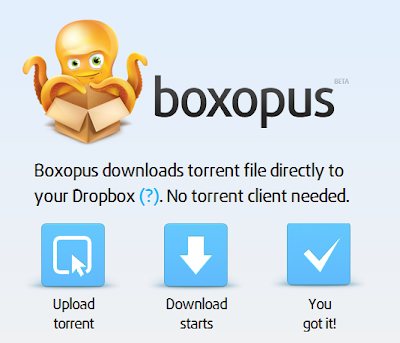
The Basic Concept behind boxopus is same as that of zbigz. You just need to upload the torrent file. One problem of boxopus that zbigz is you need an dropbox account for downloading files from boxopus. 


If you don't have any dropbox account make one from here. Create Dropbox Account Free
Then you need to install dropbox on your PC. Whenever you do a download from boxopus it get start download file to your hard disk and then get moved to your Dropbox folder.


3. Torrenthandler.com

Unlike boxopus and zbigz there is another more option in Torrenthandler which enables you to download torrent file by searching on mininova.org which is a large torrent file holder. Apart from this you can upload torrent files and put torrent links to download the torrent using IDM and other Download Managers. 


Torrenthandler doesn't decreases the direct download speed. If any speed capping i may only due to ISP problem. It is possible to download torrent files using IDM with a speed of 5 MB/Sec if your broadband bandwidth allows it.

If you have any doubt regarding download torrent files please put a comment below. We will reply within hours.


Saturday, 29 June 2013

Free Download 10 Best Professional Blogger Template Of 2013 (SEO Friendly Theme)


Are you looking for a best  Blogger template for your Blogger Blog? So here I am going to share 10 Free Premium Blogger templates of 2013 . From couple of days I was looking for some best premium looking Blogger templates, and now I have great collection of premium Blogger templates for free. The templates I am going to share in the below post are most beautiful Blogger templates. If you use any of them on your Blog it will sure make your blogger blog premium. All the templates listed below are premium and free for download. You can download these templates and install it to your Blogger blog. Check out the list of 10 Premium Blogger Templates of 2013. 

Tuesday, 18 June 2013

Sinhala & English Fonts 1000+ fonts collection


සිංහල සහ ඉංග්‍රීසි ෆොන්ට්ස් 1000 ක‍ට වඩා ‍නොමිලේ බාගත කරගන්න.

Sunday, 12 May 2013

FL Studio Save Files ( Zipped Loop Package )


Zipped Loop Package Save files By TOXIC DJ'S

Deform Rocker By TOXIC DJ'S - DOWNLOAD NOW

Linkin Park - Burn it Down Remake By TOXIC DJ'S -  DOWNLOAD NOW


Reason 5 Free ReFills By TOXIC DJ'S


TOXIC SOUND BANK FREE DOWNLOAD
with MIDI Save files, Drum Samples, Combinator Patches, SubTractor Patches and Ambient Samples.


For Free Download 
Click Here


Reason 5 Free Save Files


Crawling with you - Download Crawling With You
Hip Hop Looper - Download Hip Hop Looper